


QuickBooks Online Advanced Login, Pricing & Feature Comparison Guide

- By Jonathan Browns
- Jul 03, 2026
- Accounting
- 7 min read
Struggling to access your account, unsure about subscription costs, or trying to figure out which plan actually fits your business needs? You’re not alone. Many users look for clarity around QuickBooks Online Advanced login, its pricing, and how it compares with other QuickBooks plans before making a decision.
This guide is designed to simplify everything for you. Whether you are trying to understand how to log in smoothly, what features you get with the Advanced plan, or how its pricing stacks up against other options, we’ve got you covered.
If you are confused about whether QuickBooks Online Advanced is the right choice for your business, or how it differs from other versions, this article will help you make a clear and informed decision.
What is QuickBooks Online Advanced?
QuickBooks Online Advanced is a cloud-based accounting solution built for growing businesses. It helps you manage your finances, team, and reporting in one place without relying on multiple tools or heavy spreadsheets.
As your business expands means having more transactions, more people, and more decisions. QuickBooks Online Advanced is designed to handle that shift by offering more control, better visibility, and automation that reduces manual work.
It also allows you to customize how your business is set up, from user access and permissions to detailed reporting and tracking. Basically, it’s a smart choice for smarter and growing businesses.
Enjoy Advanced Features Available with QBO Advanced
QuickBooks Online Advanced is designed to make everyday accounting feel less heavy and more organized, especially when your business starts handling more data.
Here are some of the features that you access and enjoy while managing your business using QBO advanced:
1. Custom user roles and access control
As your team grows, not everyone needs access to everything—and that’s where custom user roles really help. You can decide who gets to view reports, who can handle transactions, and who only needs limited access for day-to-day tasks. It keeps your financial data more secure and also reduces confusion, since each team member only sees what’s relevant to them.
2. Automated workflows
A lot of time in accounting goes into small, repetitive tasks—like approvals, reminders, or follow-ups. With automated workflows, you can set these processes once and let the system handle them in the background. It not only saves time but also reduces the chances of things slipping through the cracks when business gets busy.
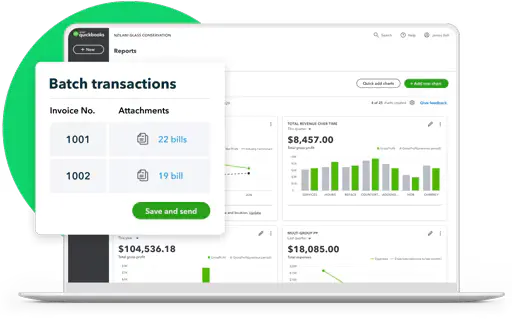
3. Batch invoicing and expense tracking
When your business starts handling more clients or transactions, doing everything one by one can get exhausting. Batch invoicing and expense tracking let you group multiple entries together and process them at once.
4. Advanced reporting and insights
Instead of just basic financial summaries, QuickBooks Online Advanced gives you more detailed reports that help you actually understand what’s happening in your business. You can track performance trends, compare periods, and dig deeper into numbers so decisions are based on real insights rather than guesswork.
5. Spreadsheet Sync with Excel and Google Sheets
If you’re someone who still prefers working with spreadsheets, this feature makes life easier. You can sync your QuickBooks data directly into Excel or Google Sheets, which means you don’t have to manually export or copy data.
6. Custom fields for better tracking
Every business tracks different things, and standard templates don’t always cover everything you need. Custom fields let you add your own details to invoices, expenses, or transactions so you can capture the information that actually matters to your workflow. It keeps everything more relevant and organised.
7. Unlimited tracking for accounts, locations, and classes
QuickBooks Online Advanced lets you do that without hitting limits. This makes it easier to understand where your money is coming from and where it’s going, giving you a clearer picture of how each part of your business is performing.
Read More:- QuickBooks Online Login
Explore Suitable Plans & Pricing of QuickBooks Online Advanced
For QuickBooks Online Advanced, instead of paying for different versions, you pay a single monthly subscription for QuickBooks Online Advanced and then add optional features if needed. This makes it easier to start simple and expand as your business grows.
The pricing is generally higher than QuickBooks Online Plus, usually around $200/month, because it includes advanced automation, reporting, and support for larger teams.
| Plan Type | What It Means | Pricing (Approx.) | Key Details |
| QuickBooks Online Advanced | Core subscription | Around $200/month | Includes all advanced features like automation, reporting, and up to 25 users |
| User Access (Included) | Team collaboration setup | Included in base plan | Supports up to 25 users with custom roles and permissions |
| Payroll Add-on | Payroll Add-on (Optional) | Extra cost (varies by region) | Can be added based on business needs |
| Time Tracking Add-on | Track work hours/projects | Extra cost | Useful for service-based or project-driven businesses |
| Third-Party Integrations | Extended functionality | Varies | Connects with apps for CRM, reporting, payments, and more |
How to Get Started with QBO Advanced Easily
To get started with QuickBooks Online Advanced, the process is quite simple by choosing the subscription plan, add-ons, setting up and finally starting up by logging into the software.
Let’s get started with QBO Advanced easily:
Sign up and activate QBO Advanced
- Go to the official Intuit website.
- Select QuickBooks Online Advanced.
- Click Start Free Trial or Buy Now.
- Sign in with your Intuit account or create a new account using your email.
- Enter your billing details and confirm your subscription.
Set up your company in QBO Advanced
- Add your company name, industry, and business details.
- Set your financial year and tax preferences.
- Connect your bank account and enable transaction sync.
- Invite users and assign roles and permissions.
Customize and start using QBO Advanced
- Open Settings and adjust preferences.
- Set up invoices and payment options.
- Enable reports and tracking features.
- Start recording transactions from your dashboard.
QuickBooks Online Plus vs Advanced vs Enterprise
QuickBooks Online Plus, Advanced, and Enterprise are built for different stages of business growth, and choosing the right one can feel a bit confusing at first.
If you’re a small business, Plus usually covers the basics like bookkeeping, invoicing, and simple reporting. As your business starts growing and you need more control, automation, and better visibility, Advanced becomes a stronger fit.
For larger or more complex businesses, Enterprise steps in with deeper inventory tools, industry-specific features, and the ability to handle more advanced accounting needs without slowing things down.
| Feature | QuickBooks Online Plus | QuickBooks Online Advanced | QuickBooks Enterprise |
| Best For | Small businesses | Growing businesses | Large or complex businesses |
| Deployment | Cloud-based | Cloud-based | Desktop / Hosted |
| Users | Up to 5 | Up to 25 | Up to 40+ |
| Automation | Basic | Advanced workflows | Advanced + industry-specific |
| Reporting | Standard reports | Advanced reporting & analytics | Highly customizable reporting |
| Inventory Management | Basic | Moderate | Advanced |
| User Permissions | Limited | Custom roles & permissions | Highly detailed controls |
| Accessibility | Anywhere (online) | Anywhere (online) | Desktop or remote hosting |
| Pricing | Lower cost | Mid-range | Higher cost |
| Scalability | Limited | High | Very high |
Benefits of Using QuickBooks Online Advanced
QuickBooks Online Advanced is designed for growing and mid-sized businesses that need more control, automation, and scalability in their accounting system. Here are the key benefits:
- It provides highly customizable reports and dashboards, allowing businesses to track financial performance in detail and make data-driven decisions.
- Recurring transactions, automated workflows, and smart categorization help reduce manual bookkeeping and save time on repetitive tasks.
- You can assign multiple user roles with precise permissions, ensuring sensitive financial data is only accessible to the right people.
- It supports more complex operations, higher transaction volumes, and multiple departments or locations without slowing down.
- Users can process multiple invoices and expenses at once, improving efficiency for finance teams handling large workloads.
- It connects with a wide range of third-party apps, enabling businesses to extend functionality for payroll, CRM, inventory, and more.
- Advanced users get access to priority support and training tools to help teams use the platform more effectively.
Summing Up
The QuickBooks Online Advanced login, pricing confusion, or feature-related issues can interrupt essential business tasks such as accessing reports, managing subscriptions, or using advanced accounting tools. In most cases, the issue is linked to incorrect login credentials, subscription plan mismatch, browser-related issues, or confusion between different QuickBooks Online plans.
If the issue still persists after trying all the steps, consider clearing browser cache, verifying your subscription status, or contacting QuickBooks support for further assistance.
Frequently Asked Questions
What does QuickBooks Online Advanced include?
QuickBooks Online Advanced is built for growing businesses that need more control and flexibility. It supports up to 25 users and lets you set custom roles so everyone only sees what they need to.
You also get powerful tools like batch invoicing and expense tracking, along with automated workflows that help save time on repetitive tasks.
What is the difference between QBO Plus and QBO Advanced?
The key difference between QuickBooks Online Plus and Advanced is scale and automation. Plus supports up to 5 users with basic tracking for around $90/month, while Advanced supports up to 25 users and includes unlimited tracking, workflow automation, and Spreadsheet Sync for about $200/month.
What does QuickBooks Online Advanced cost?
QuickBooks Online Advanced typically costs around $200 per month, though pricing can vary slightly based on region, offers, or billing plans.
Is QBO Advanced worth it?
Yes, QuickBooks Online Advanced is worth it for growing businesses that need more than basic accounting tools. It makes sense if you have a larger team, need automation to save time, or want deeper reporting and better control over user access.
However, if you’re a small business with simple accounting needs, QuickBooks Online Plus may be more cost-effective and easier to manage.
What is included in QuickBooks Online Advanced?
QuickBooks Online Advanced comes with tools that help you manage growing business needs more smoothly. You get features like custom user roles, automated workflows, batch invoicing, advanced reporting, and Spreadsheet Sync, along with support for up to 25 users.
How is QuickBooks Online Advanced different from Plus?
The main difference is scale and flexibility. Advanced is built for growing teams, offering more automation, customization, and higher user limits, while Plus works well for smaller businesses that only need the basics.
About The Author

Jonathan Browns
Jonathan Brown is a trained QuickBooks professional with 10 years of experience in the accounting sector. Moreover, he is passionate about helping businesses reduce the stress of managing accounts. Also, he is proficient in assisting entrepreneurs and small business owners to use QuickBooks and enhance their accounting experience.
Recent Posts
-
How to Fix QuickBooks Error 6177, 0: Complete Troubleshooting Guide
-
QuickBooks Online Payroll Not Working: Causes & Solutions to Fix It
-
How to Fix QuickBooks Error 6129, 0: Database Connection Failed
-
QuickBooks Outlook is Not Responding? Let’s Fix It Immediately
-
How to Fix QuickBooks Error Skipped 111 (Complete Guide)