


QuickBooks Desktop 2022 Discontinued – Guide for Transitioning Smoothly

- By Jonathan Browns
- May 12, 2026
- Accounting
- 7 min read
To ensure users benefit from improved features and performance, Intuit retires older versions of QuickBooks each year. As part of this process, the QuickBooks Desktop 2022 Discontinued policy will take effect on May 31, 2025. Once it begins, users will no longer receive security patches or live support.
This post provides a complete overview of the discontinuation policy and guides you through upgrading to a newer QuickBooks Desktop version or transitioning to QuickBooks Online. We also explain what the change means for current 2022 edition subscribers.
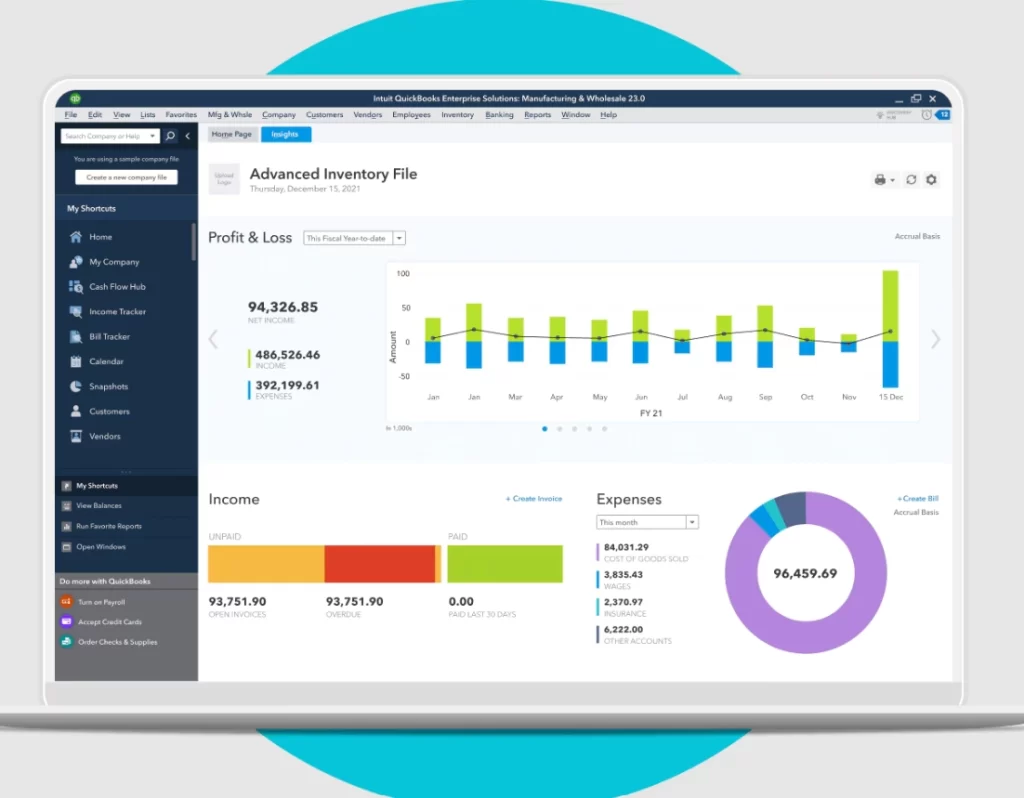
Learn More About the Discontinuation of QuickBooks Desktop 2022
Intuit, the parent company of QuickBooks, periodically reviews its product offerings to stay compliant with technological advancements and market demand. The discontinuation of QuickBooks Desktop 2022 is part of this strategic shift towards cloud-based solutions. The main motive of the discontinuation is to offer its users more flexibility, improved security, and the ability to access their financial data from anywhere, anytime.
Read Also- QuickBooks Desktop 2025 Release Date
Has QuickBooks Desktop 2022 Been Discontinued?
Yes, according to the latest update by Intuit, it is specified that the QuickBooks Desktop 2022 software is going to phase out after May 31, 2025. As a result, it prevents the users from getting the security updates from June 1 2025. However, it is advised that if you notice any updates launching before this discontinuation date, install them immediately. Moreover, after the discontinuation, the users fail to access the 2022 versions of QuickBooks Desktop, which might consist of QuickBooks Desktop Pro, Premier, Enterprise Solutions and Accountant Editions 2022.
After the discontinuation the users can also switch to the QuickBooks Online application for more flexibility and collaboration. Moreover, it also provides you with the features like automatic bank account updates using which you can access the data remotely.
When Will QuickBooks Desktop 2022 Be Discontinued? – A Brief Explanation
The QuickBooks Desktop 2022 is going to be discontinued after May 31 2025 which prevents the users from getting the live support facility. Therefore, for completing your financial tasks all you require is to migrate from QuickBooks Desktop to Online. Otherwise, if you wish to use the QuickBooks Desktop version then it’s suggested to upgrade them to the newly launched version.
Impact of QB Desktop Service Discontinuation Policy On Users
After the latest announcement made by the Intuit regarding the QuickBooks Desktop Service Discontinuation Policy has caused a severe stress on the current Desktop users. This is so because the discontinuation policy will prevents the users from accessing numerous features which might hamper their ongoing work. However, below, we have discussed about all those factors that is being affected with the discontinuation.
- Unable to Access the Live Support Facility:-
The current subscribers of the QuickBooks Desktop 2022 editions will not be able to obtain the live support facility if you are stuck with the issues faced while running other Intuit services. These services might include QuickBooks Desktop Payroll, online bank feeds, and QuickBooks Desktop Payments.
- Products You Can’t Use After Discontinuation:-
Moreover, the users also won’t be able to access certain QuickBooks Desktop 2022 products after the discontinuation, which are as follows:
- QuickBooks Desktop Pro Plus 2022
- QuickBooks Premier Accountant Edition Plus 2022
- QuickBooks Desktop for Mac Plus 2022
- QuickBooks Desktop Premier Plus 2022 (General Business, Professional Services, Contractor, Manufacturer & Wholesale, Non-Profit)
- QuickBooks Enterprise Solutions 22
- QuickBooks Enterprise Accountant 22
- Affected Services of QuickBooks Desktop 2022 Edition
Below, we have listed all those services that you won’t be able to access after the QuickBooks Desktop 2022 discontinuation policy.
1. Payroll Services:-
- Assisted Payroll:-
After the discontinuation policy, the users won’t be able to compute the appropriate payroll taxes, payroll forms or send the payroll data to their employees. Moreover, it will cancel your subscription automatically after the May 31, 2025 and it won’t allows you to file the tax forms on your behalf. In short, the users have to file their forms on their own.
- QuickBooks Workforce (usually via PayCheck):-
Now, the users will not be able to use the QuickBooks Workforce feature anymore. For that, all you require is to have an active and valid QB payroll subscription to run this payroll service seamlessly.
- Basic, Standard or Enhanced Payroll:-
With the effect of the discontinuation policy, it stops the users from calculating the payroll taxes accurately. Besides this, you may found that the paychecks might be incorrect and your subscription will be canceled automatically.
- Payroll:-
Fails to computer the paychecks accurately as per the latest tax table returns and your subscription will automat’ gets deactivated.
2. Credit Card Processing:-
- Payment Processing:-
The users might get a notification alert on their screen reflecting service is not available any more. As a result, it restricts the users from processing credit card and check transactions via QuickBooks Desktop 2022. Moreover, it will start flashing the message that carries the guidelines regarding processing credit card and check transactions outside of the QuickBooks.
- eInvoice:-
Another feature you can’t be able to perform is processing the eInvoice via QuickBooks Desktop 2022 edition. To make this feature available, you must have a valid QuickBooks subscription and an active payments subscription.
- Recurring Payments:-
Recurring payments feature is no longer available for the Desktop 2022 users. For keeping track of the recurring payments you must visit us at MerchantCenter.intuit.com.
- Merchant Service Deposit (reconciliation):-
It prevents users from getting credit cards and checking the details of the product downloaded.
3. Other Services:-
- Online Banking:-
The users won’t be able to download the transactions, or might face difficulties while sending the online transfers. However, the error message that you receives on the screen entirely depends upon your download method.
- Contributed Reports:-
This feature can’t be accessed by QuickBooks Desktop 2022 users.
- Multi-Currency/Exchange Rate:-
The users don’t require to enable or disable this feature for assigning some specific currency types along with your profiles and accounts in the QuickBooks Desktop application.
- Accountant Copy Transfer Service:-
Another feature is that it prevents you from sending the accountant copies in QuickBooks Desktop with the help of this service.
Features You Can’t Access in QuickBooks Desktop 2022
According to the latest announcement of the QuickBooks Desktop 2022 discontinuation policy, users won’t be able to access certain features, which are as follows.
1. Loan Manager:-
The Loan Manager is a feature that lets the users compute the interest and payment schedules. Moreover, it allows new and existing loans to be made repayments. But, now you won’t be able to use this feature in the QuickBooks Desktop 2022 edition any more.
2. Scan Manager:-
The QuickBooks Scan Manager is used to scan the receipts, reports and other financial documents so that you can add them to your invoices, sales receipts and other transactions. But, the sad part for the QuickBooks Desktop 2022 editions is they won’t be able to use this feature anymore. For using it, they are required to upgrade their application to the QuickBooks Desktop 2024 edition.
Learn here– Update QuickBooks Desktop to 2024
3. Cash Flow Projector:-
The main purpose of the Cash Flow projector in QuickBooks Desktop is to show you the current as well as the future cash flows, which depend upon the different circumstances. After estimating the projection, the data will be utilized in QuickBooks to learn about the status of your business finances in the upcoming six weeks. However, if you wish to access this feature, then you are required to switch to the updated version as it won’t be available in QuickBooks Desktop 2022 anymore.
4. QuickBooks Pro Timer:-
QuickBooks Pro Timer is used to monitor the total time spent by the employees during their working hours. This application gives you a clear picture of the time the employees spend, which will help them compute payroll. However, it won’t be able to be used in the QuickBooks Desktop 2022 edition.
Note:- QuickBooks 2023 has been discontinued. Upgrade to the latest version for continued support, security updates, and improved features.
Features Can You Use With the QuickBooks Desktop 2022 Edition
We have described the features that users can use by accessing the QuickBooks Desktop 2022 edition herein.
1. Uploading Of Documents With Your Mobile:-
The scan manager feature in QuickBooks is replaced with the Attach documents feature. So, now the users have the option to upload their documents through their mobile phones and then import them to the QuickBooks application.
2. Monitoring the Loans in QuickBooks:-
You won’t be able to monitor the transactions consisting of principal repayment and interest expense automatically. The users are supposed to include all such transactions manually in the QuickBooks Desktop 2022 edition.
3. Searching of the QuickBooks Desktop Marketplace:-
You can now look for the alternative low-cost solutions to the Cash Flow Projector in QuickBooks Desktop Marketplace. This feature mainly focused on the third-part applications which is sponsored by the independent developer partners.
4. Access the Time Tracker Feature in QuickBooks Desktop:-
Another feature you can use with the QuickBooks Desktop is Time Tracker, which you can’t import the timesheets from the QuickBooks Pro any longer. For that, you need to manually include the timesheets within the application.
Conclusion
So, here we are going to end this post and hope that you have gained enough information regarding the QuickBooks Desktop 2022 Discontinued policy. However, if you are still struggling with this issue, then simply consult with our QB professionals at +1-866-408-0444 and clarify all your doubts within no time.
Frequently Asked Questions (FAQ’s)-
FAQ 1: When is QuickBooks Desktop 2022 being discontinued?
QuickBooks Desktop 2022 products will be discontinued on May 31, 2025. After this date, Intuit will no longer provide security updates, support, or access to connected services such as payroll, payments, or online banking.
FAQ 2: What services will stop working after the discontinuation?
After May 31, 2025, key connected services will no longer function, including:
- QuickBooks Desktop Payroll
- QuickBooks Payments (merchant services)
- Online banking/Bank Feeds
- Bill Pay
- Accountant features requiring online access
You can still use the core software, but without updates or online services.
FAQ 3: What are my options if I’m using QuickBooks Desktop 2022?
You can choose one of the following options:
- Upgrade to a supported version of QuickBooks Desktop (such as Desktop 2025).
- Switch to QuickBooks Online if you prefer cloud-based access.
- Continue using QuickBooks Desktop 2022, but you will do so without support or connected services.
About The Author

Jonathan Browns
Jonathan Brown is a trained QuickBooks professional with 10 years of experience in the accounting sector. Moreover, he is passionate about helping businesses reduce the stress of managing accounts. Also, he is proficient in assisting entrepreneurs and small business owners to use QuickBooks and enhance their accounting experience.
Recent Posts
-
QuickBooks Payroll Update Not Working? Easy Fixes Here
-
How to Fix QuickBooks Error Code 6143 – Complete Step Guide
-
How to Fix QuickBooks Error PS034 (Payroll Update Failure Issue)
-
Why Is QBCFMonitorService Stopped in QuickBooks? Troubleshooting Guide
-
QuickBooks Error 6131, 0 When Opening a Company File? Try These Fixes