


Best Bookkeeping Software for small business in 2026: Quick Updates

- By Jonathan Browns
- Jan 23, 2026
- Bookkeeping
- 7 min read
Running a small business is a bit challenging as it comes with a lot of responsibilities, including managing finances and daily business tasks. So, one of the best ways to keep your business accounting operations running smoothly is to opt for accounting and bookkeeping software. In this guide, we have covered all the best bookkeeping software for small business. You must read this guide carefully and then make the right decision for your organization.
Need help in selecting the right bookkeeping software for small business? Talk to our Accounting professionals for better guidance by Call Us : +1-866-408-0444.
Checklist to Pick the Suitable Bookkeeping Software For Your Business
Herein, we have described some of the basic criteria on the basis of which you can make the right decision in picking the best bookkeeping software for your business.
- User-Friendly Interface: The first thing you must check is that the software you are choosing has a user-friendly interface. In short, you must look for the software that doesn’t require much accounting knowledge to run.
- Key Features: Another thing to look for in the best bookkeeping software is to check that it includes all the essential features. It includes invoicing, expense tracking, bank reconciliation, payment platforms, CRM systems, and e-commerce tools.
- Customer Support: Choosing reliable customer support is essential for a small-scale business. You must opt for the bookkeeping software that provides robust support options, consisting of live chat options, phone support, and knowledge base options.
- Security: As you all know, the importance of keeping the financial data safe and secure. So, it’s essential to ensure that the software you select meets all the security standards. As a result, it will help in safeguarding your company’s data from any unauthorized access.
- Pricing Structure: Before purchasing any bookkeeping software for the small business, you must review the pricing structure. Herein, you must have a look at the transparency in cost and check if the software fits best according to your budget.
What are the Top Bookkeeping Software for small businesses?
Below, we have provided you with a table illustrating the best bookkeeping software according to your specific needs.
| Software | Best For | Key Features | Pricing |
| QuickBooks Online | Small to large scale businesses | Bank reconciliation, invoicing, expense tracking, advanced reporting and integrations. | $25–$50+/monthly |
| Xero | Small to medium-size businesses | Payroll, inventory, reporting | $12–$40+/monthly |
| FreshBooks | Small Businesses that includes Freelancers, Self-employed professionals and contractors. | Time tracking, client invoicing, expense monitoring | $6–$30+/monthly |
| Sage Business/Sage Accounting | Small enterprises with compliance needs. | Cash flow forecasting, reporting | $10–$25+/monthly |
| ZohoBooks | SMBs & Zoho ecosystem users | Workflow automation, integration with CRM/inventory | Free tier / ~$10–$30+/monthly |
| Wave Accounting | Freelancers & Micro-businesses | Free invoicing, expense tracking, basic reports. | Free (paid add-ons) |
What is the Top Best Bookkeeping Software For Small Business?
Herein, we have provided you with the list of different bookkeeping software for small businesses.
1. QuickBooks Online:
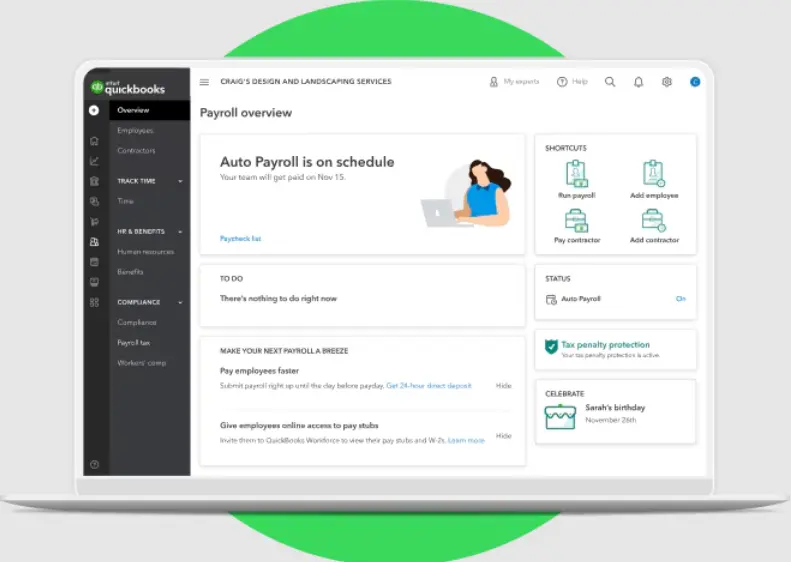
QuickBooks Online is an excellent cloud-based software best suited for small to medium-scale businesses. With every plan, you will get access to the Intuit Assist, Intuit’s new AI-powered automation tool that helps you streamline tasks like categorizing transactions and following up on unpaid invoices. Its mobile app lets you manage your books anywhere, and it integrates with 800 other tools and platforms to help you manage payments, inventory, payroll, project management, customer relationship management (CRM), and more.
Features You Can Access
By running the QBO application, you can get access to the following features:
- Invoicing
- Tracking expenses
- Managing bills
- Tax deductions
- Financial reporting
- Mileage tracking
- Payment collection
- Project management
- E-commerce management
- AI automation
Integrations
By running the QBO application, you can integrate with the third-party apps, including:
- BILL
- Expensify
- QuickBooks Time
- Bluevine
- Rewind Backups for QuickBooks Online
- Bookkeep Accounting Automation
- Tax1099
Cost:
The QuickBooks Online application includes four different plans:
| Simple Start | Essentials | Plus | Advanced |
| $19 monthly & Save up to 50% for 3 months. | $37.50 monthly & Save up to 50% for 3 months. | $57.50 monthly & Save up to 50% for 3 months. | $137.50 monthly charges & Save up to 50% for 3 months. |
2. Xero
Xero is another best bookkeeping software perfect for large teams. This is so because, like any other competitor, Xero puts restrictions on the number of users per plan; Xero gives access to unlimited users across all tiers. Moreover, this feature makes the software affordable for businesses with multiple departments or growing accounting and finance teams. So, no matter whether it is a bookkeeper or a manager, you can access the system without paying any extra charges.
Features:
You can get access to the following features by running Xero.
- Accepting payments
- Invoicing
- Bank reconciliation
- Expense management
- Bill management
- Purchase order and quote generation
- Sales tax
- Project management
- Financial reporting and analytics
- Fixed asset management
Integrations:
You can integrate Xero with the following third-party apps:
- Stripe
- Zapier
- Hubspot
- PayPal
- AutoEntry
- Reach Reporting
- Hubdoc
Cost
| Starter | Standard | Premium |
| $5.80 USD per month Save $69.60 over 3 months | $10 USD per month Save $120 over 3 months | $15 USD per month Save $180 over 3 months |
3. FreshBooks
FreshBooks is one of the best bookkeeping software for small businesses. It is an all-in-one software for small businesses that helps with various tasks, including invoicing, tracking expenses, and client invoicing. Moreover, this software is a perfect fit for freelancers, Solopreneurs, businesses with employees, and businesses with contractors.
Features
The following are the features that you can access by running the FreshBooks software.
- Invoicing
- Payment collection
- Time tracking
- Expense and receipt tracking
- Mileage tracking
- Bookkeeping capabilities
- Financial reporting
- Project management
- Proposal and estimate generation
- Client portals
Integrations
The FreshBooks software enables you to integrate with over 100 other business platforms that include:
- Acuity Scheduling
- DocuSend
- Gusto
- Zoom
- Fundbox
- Trello
- Microsoft Outlook
Cost
| Lite | Plus | Premium |
| $8.40 USD monthly + 60% Off for 3 Months | $15.20 USD monthly + 60% Off for 3 Months | $26.00 USD monthly + 60% Off for 3 Months |
4. Zoho Books
Zoho Books is a comprehensive bookkeeping solution for growing businesses that helps in handling end-to-end accounting. You can easily manage different tasks from banking & e-invoicing to inventory & Payroll smoothly. This is a great choice for a start-up, small business, medium-sized business, or non-profit organization. Another great thing about this software is that it offers free accounting for small businesses.
Features:
You can get access to the following features by running Zoho Books.
- Invoicing
- Sales Orders
- Bills
- Online Payments
- Purchase Orders
- Expenses
- Quotes
- Reporting
- GST Filing
- E-Invoicing
- Audit Trail
- Document Management
- Mobile Accounting
- Zoho Ecosystem
- Collaboration & Portal Management
- Smart automations
Integrations
Zoho Books lets users integrate with multiple other business software platforms, including:
- SurePayroll
- Google Workspace
- Zapier
- Stripe
- Zoho Sign
- Slack
- Tax 1099
Cost
| Standard | Professional | Premium | Elite |
| ₹749 Price/Org/Month Billed Annually | ₹1,499 Price/Org/Month Billed Annually | ₹2,999 Price/Org/Month Billed Annually | ₹4,999 Price/Org/Month Billed Annually |
5. Wave
Wave is an excellent bookkeeping software designed for new business owners, as it is a straightforward entry point into accounting with less upfront costs. By having a free Starter plan, users can take advantage of useful features that include invoicing, expense tracking, and basic financial reports. However, businesses that are all set to expand can use the Wave’s paid plan, which is also less expensive in comparison to other software.
Above all, Wave offers fewer advanced features in comparison to other accounting and bookkeeping platforms. As a result, it makes it suitable for freelancers and small businesses. So, if your business is expanding, then it’s suggested to pick any other accounting solution for your business.
Features
You can get access to the following features by running the Wave software.
- Invoicing
- Payments
- Estimates & Deposits
- Payroll
- Bank Reconciliation
- Accounting Dashboard
- Automations
Integrations
You have the option to integrate the Wave software with other applications. For integrating with other apps, you have to run Zapier, which is a paid third-party application. This is so because the Wave software doesn’t integrate directly with other business solutions.
Cost
| Starter Plan | Pro Plan |
| $0 | $19USD/month Billed monthly |
6. Sage 50 Cloud Accounting
Sage 50 is also a renowned cloud-based accounting and bookkeeping software that helps businesses accomplish their daily financial tasks. You can also get access to the bookkeeping features that include invoicing, bank reconciliation, expense tracking, and financial reporting.
Besides this, it is a perfect accounting solution for small businesses that helps them manage their business operations easily.
Features:
The following are the features that you can use in Sage 50 Cloud accounting to enhance your accounting experience.
- Invoicing
- Expense management
- Bank reconciliation
- Bill Tracking
- Job Management and Job Costing
- Purchase Order generation
- Financial Reporting
- Payroll and tax compliance
- Inventory Management
Integrations
The Sage 50 software can be integrated with 26 other business software platforms that comprise:
Cost
| Pro Accounting | Premium Accounting | Quantum Accounting |
| $124.42 /month | $169.33 /month | $253.42 /month |
| 1 User | 1-5 Users | 1-40 Users |
Conclusion
Choosing the best bookkeeping software for a small business might be a bit of a complicated task unless you have proper guidance. We hope that by going through this post, it has become easier to pick the suitable bookkeeping software that meets your company’s requirements.
Furthermore, if you are still looking for any expert guidance, then have a one-to-one consultation with our BizBooksAdvice professionals. You can connect them via Call Us : +1-866-408-0444 or through live chat and get an instant solution for your query.
Frequently Asked Questions (FAQ’s):-
Question 1: How to start bookkeeping for a small business?
Ans. To initiate bookkeeping for a small business, you need to open a business bank account and pick the accounting software. Then, you need to consistently record the income and expenses incurred, save all receipts, and reconcile the bank statement. Later on, you can recheck the financial reports for accuracy and better tax preparation.
Question 2: How to choose the best bookkeeping near me?
Ans. If you are looking for the best bookkeeping near you, then you can simply call BizBooksAdvice []tfn. You can consult with our professionals, and they will offer you excellent bookkeeping services for your business.
Question 3: Can bookkeeping software help me with taxes?
Ans. Yes, there are many bookkeeping platforms, such as QuickBooks, which help in creating tax reports and in making the filing easier.
Question 4: How do I choose the right software for your business?
Ans. To pick the right bookkeeping software for your business, you must focus on the following key points:
- Depending on your business size and growth plans
- Budget constraint
- Useful features
- user-friendly
Question 5: Should I use bookkeeping software or hire a professional bookkeeper?
Ans. Accounting software is perfect for managing daily bookkeeping activities and saving costs. But hiring a professional bookkeeper or accountant may help you in setting up charts of accounts, ensuring compliance, managing payroll, and preparing reports.
About The Author

Jonathan Browns
Jonathan Brown is a trained QuickBooks professional with 10 years of experience in the accounting sector. Moreover, he is passionate about helping businesses reduce the stress of managing accounts. Also, he is proficient in assisting entrepreneurs and small business owners to use QuickBooks and enhance their accounting experience.
Recent Posts
-
QuickBooks Desktop Enterprise: Pricing, Features, Download & Setup
-
Fixing QuickBooks Error 1606: Could Not Access Network Location
-
QuickBooks Error 3100: Causes, Solutions, and Prevention Tips
-
How to Perform QuickBooks Messy Books Cleanup: Step-by-Step Guide
-
How to Fix QuickBooks Error 6177, 0: Complete Troubleshooting Guide