


Everything You Must Know About QuickBooks I-9 Form

- By Jonathan Browns
- May 16, 2026
- Taxation
- 7 min read
The I-9, also known as the Employment Eligibility Verification form, is used by every employer when a new employee is hired to work in the United States. Basically, the purpose of this form is to ensure the work eligibility of every worker who is hired for a job. Herein, in this guide, we have explained everything regarding who must file, when to file, how to file, and penalties for late filing of the QuickBooks I-9 form.
What is Form I-9 in QuickBooks?
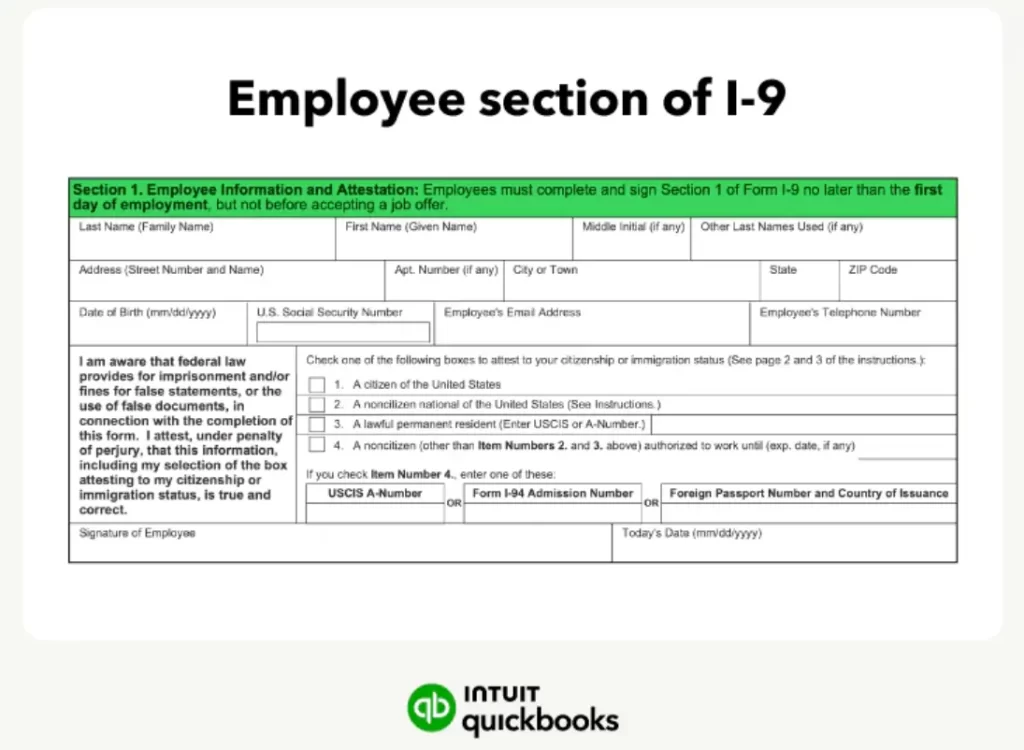
The i9 form is an Employment Eligibility Verification form that is used to document verification of the identity and employment authorization of a new employee hired after Nov 6, 1986, to work in the U.S.
Why Employers Must File Form I-9?
The IRS taxation form I-9 must be completed by all U.S. employers for every individual they hire for employment within the United States.
Documents Required For Form I-9
It is essential that all your employees complete and sign Section 1 of the IRS I-9 form on the first day of employment. It is basically a format for the beginning of employment of an employee for wages or other remuneration. Also, it is essential to complete Section 1 of the form anytime after accepting the job offer. Herein, both the preparers and translators can guide the employees in completing Section 1.
Note: You have the option to check the employee’s document and fully complete Section 2 any time between the date of the employee’s acceptance of the job offer and fill in Section 1 within three business days of hiring.
Documents You Require Before Filing the I-9 Form
It is essential for employees to provide the following documents to their employers to show their identity and authorization to work.
List A Documents: Prove identity and work eligibility
The documents provided on List A represent both identity and employment authorization. The employees who are presenting an acceptable list A document mustn’t be asked to present any other document. However, there are a few of the List A documents that are a combination of 2 or more documents.
Documents that help to generate both identity & employment authorization (Delete it from here)
- U.S. Passport or U.S. Passport Card
- Permanent Resident Card or Alien Registration Receipt Card (Form I-551)
- A foreign passport that has a temporary I-551 stamp or a temporary I-551 printed notation on a machine-readable immigrant visa.
- Employment Authorization Document with a photograph.
- Foreign Passport with Form i-94 or Form i-94A along with Arrival Departure Record. Also, you need an endorsement to work.
- Passport from the Federated States of Micronesia (FSM) or the Republic of the Marshall Islands. Along with the Form I-94 or Form I-94A, representing non-immigrant admission
List B Documents: Identity Only
The documents on List B generate only identity. However, the employees who prefer to present a List B document must also present a document from List C for Section 2.
Documents that Establish Identity (Delete it From here)
- School ID having a photograph
- Voter’s registration card
- U.S. military card or draft record
- Military dependent’s ID card
- U.S. Coast Guard merchant mariner card
- Native American tribal document
- Driver’s license issued by a Canadian government authority
- An ID card that is issued by federal, state, or local government agencies or entities. Also, it must have a photograph or details like name, date of birth, sex, height, eye color, and address.
- Driver’s license or ID Card issued by a State or outlying possession of the U.S. having a photograph or details including name, date of birth, sex, height, eye color, and address.
List C Documents: Eligibility only
Employees who prefer to present a List C document must provide a document from List B, proof of identity, for Section 2.
Documents that Establish Employment Authorization (Delete it From here)
- U.S. Social Security Card
- Identification card for Use of Resident Citizen in the U.S. (Form i-179)
- Native American tribal document
- Employment authorization document issued by the Department of Homeland Security (DHS)
- U.S. Citizen ID Card
- Certification of report of birth issued by the Department of State (Forms DS-1350, FS-545, FS-240).
- Original or certified copy of birth certificate issued by a State, country, municipal authority, or territory of the United States with an official seal.
- Identification Card for Use of Resident Citizen in the U.S. (Form I-179)
How to Fill Form I-9 Form in QuickBooks Payroll?
It is advised that every employer must complete and retain the i9 form for every person they hire for employment after Nov 6, 1986, in the U.S., as long as they work for pay or any other kind of payment.
Section 1: Employee Information and Attestation
First Step: Employees must complete Section 1 no later than the first day of employment
- Each and every employee must enter their personal details.
- While filing the name fields, provide your legal name and any last name you used, including hyphens and punctuation. If you are having a single name, enter it into the Last name and add Unknown in the First name field.
- Insert the 9-digit SSN, unless your employer participates in e-verify.
Second Step: Attest to your citizenship or immigration status
You must tick-mark any one of the checkboxes to attest to your citizenship or immigration status.
- A citizen of the United States
- A non-citizen national of the United States
- A lawful permanent resident
- An alien to work
Third Step: Sign & Enter the date you signed Section 1
Do not backdate this field.
Fourth Step: Preparer and/or translator completes a Preparer and/or Translator Certification, if applicable
If a preparer/translator guides an employee in filling out Section 1, the person must complete the certification area on Supplement A. There is no certain limit to the number of preparers/translators an employee can access.
Fifth Step: Present i9 Documentation
Within three business days after the first day of employment, you and your employee must present to your employer original, acceptable, and unexpired documentation. In case you are hired for less than three business days, you have to provide the documentation on the first day of employment.
An employer can’t restrict any specific documentation to present from the List of Acceptable Documents. You either have to present the selection from List 1 or a combination of one selection from List B and one selection from List C.
Section 2: Employer Review & Verification
Before moving to Section 2, you, the employer, must check Section 1 to verify that all the details are entered correctly. If any details are missing or incorrect, then the employee must edit the error in Section 1 and then date the correction.
First Step: Provide Information from the documentation the employee presents
You, the employer, or authorized representative should either physically examine or examine through an alternative procedure assigned by the Secretary of DHS. Also, you must require the original, acceptable, and unexpired documentation that the employee presents from the List of Acceptable Documents for completing Section 2.
List A Documentation reflects both identity and employment authorization.
- Enter the necessary details from the List A documentation within the List A column.
- If an employee shows acceptable List A Documentation, you mustn’t prompt the employee to provide the List B and List C documentation.
List B documentation reflects identity only, and List C reflects employment authorization only.
- If you see that an employee presents acceptable List B and List C documentation, provide the details from the documentation below each corresponding column.
- On the other side, if the employee is under 18 years or has disabilities and fails to provide List B documentation, look at the M-274 for assistance.
Second Step: Provide Necessary Information, if required
You have to access the Additional Information field for recording any necessary information required to complete Section 2. You have to date each additional notation and review each notation, including
- That is required by DHS, like extension of employment authorization or a document’s expiration date.
- Replacement document details in case the receipt was already presented.
- Also, you may require additional documentation that you need to present, such as certain non-migrant documentation.
Above all, you also need to provide optional information, including termination dates, form retention dates, and E-Verify case numbers, if possible.
Third Step: Choose the box in the Additional Information area if an alternate procedure for document examination is authorized by the Secretary of DHS.
Choose this box if you used an alternative procedure authorized by DHS for the examination of the documents. However, you can access the M-274 for guidance on applying procedures for document examination approved by the Secretary of DHS.
Fourth Step: Complete the Employer Certification
Herein, the employers or their authorized representatives must fill in all applicable fields, sign, and then date where indicated.
Reverification & Rehire
If you want to reverify an employee’s work authorization or want to document an employee’s rehire, you must access Supplement B.
On the other side, if you wish to rehire an employee within three years from the date the employee’s Form I-9 was completed, then complete the supplement and link it with the employee’s previously filled Form I-9.
Employee & Employer Instructions Related to E-Verify
E-Verify makes use of the I-9 form for confirming the employee’s employment eligibility. To obtain additional details, visit www.e-verify.gov or connect at www.e-verify.gov/contact-us.
Employers who have participated in E-Verify must require:
- You must insert the Social Security Number within Section 1.
- Mentioning your email address and telephone number in Section 1 will allow you receive a notification related to the E-Verify case.
- If you get a List B document from your employer, then it must have a photograph.
For the E-Verify employers
- Verify that the employees have inserted their Social Security numbers in Section 1.
- Also, you must retain copies of certain documentation.
- List B is only accepted if it carries a photograph.
How to Use Form I-9 in QuickBooks Online Payroll Premium & QuickBooks Online Payroll Elite?
If you haven’t already completed the I-9 form for your new employee, then you and your employee have access to the digital Form I-9 in QBO Payroll Premium & QBO Payroll Elite. But the digital form isn’t available for QuickBooks Online Payroll Core.
Get Started
- Initially, move to All Apps > Payroll and then click the Employees tab.
- Choose the Add an Employee option and provide your new employee’s name, email address, and their hiring date.
- After this, pick the Include employment eligibility Form I-9.
- At last, opt for the Add Employee menu.
Further Steps For Your Employee
- Your employee will obtain an email invitation to set up a QuickBooks Workforce account.
- After this, the employee will provide their personal forms and then complete their Form I-9.
Further Steps For You
All you require is to check your employee’s eligibility documents, and then fill in the section of the I-9 form. It can be done in two different ways:
In the QBO Application
- Initially, move to All apps > Payroll > Employees tab.
- After this, choose your employee.
- Thereon, from the Employment Eligibility, opt for the Start option.
- Fill in the form and then upload the copies of your employee’s documents.
Otherwise, you may also receive an email notification. Thereon, pick the Complete I-9 form and then upload the copies of your employee’s documents.
Penalties For Incorrect or Late Filing of QuickBooks I-9 Form
If the employers couldn’t file the QuickBooks I-9 form in a timely manner, including missing the 3-day completion window, then it is considered a non-compliance/paperwork violation under U.S. federal law.
Employer Penalty For Late or Incorrect i-9 Filing
| Missing/Incomplete/Not Retained i-9 | $110- $1,100 + per form (statutory) Often it may vary $281 to $2789. |
| Knowingly hiring unauthorized worker | $698 – $27,894 + per worker (tiered) |
| Pattern/practice or Fraud | Fines and possible criminal penalties |
| Discrimination or Document abuse | Separate civil fines (higher amounts) |
| E-verify Failure | Not informing DHS of final non-confirmations may also charge fines. |
How to Download & Print the QuickBooks I-9 Form?
The U.S. Citizenship and Immigration Services offers details regarding downloading and Printing Immigration Forms. Furthermore, perform the steps below to print the I-9 forms.
- Primarily, browse to the USCIS website by using the www.uscis.gov/i-9 to download the latest version of the form.
- After this, tap on the downloaded link provided to get the form downloaded on your system.
- Now, launch the downloaded PDF with the new version of the Adobe Acrobat Reader.
- Furthermore, mention the Information directly in the PDF fields.
- Once the I-9 form is filed, start printing the form. Herein, you also need to sign and then date it manually.
Conclusion
We ensure that now, by reading this post, you can easily file and print the I-9 form. Thus, it will help the employers and employees in filing the taxes timely without any further delays. Furthermore, if you still need any help, then connect with our BizBooksAdvice professionals for help.
Frequently Asked Questions (FAQ’s):-
Question 1: Why is i-9 verification required?
Ans. The I-9 form verification is necessary to verify the identity and employment authorization of individuals hired for employment within the U.S.
Question 2: Can I fill out a Form I-9 electronically?
Ans. Yes, if you opt for e-filing the I-9 form electronically, it is essential that your system meets specific requirements. These include attaching the signature to the form, recording the signature at the time of completion, verifying the signer’s identity, and providing a printed confirmation upon request.
Question 3: How long does it take to submit an i9 form?
Ans. If you are an employer, then it is essential that you and your authorized representative complete and sign the I-9 form within three business days from the date of hiring the employee.
Question 4: Who is not required to submit the Form I-9?
Ans. If you are self-employed, then you don’t have to complete the I-9 form on your own behalf unless you are an employee of a separate business entity, like a corporation or partnership. In such a scenario, you and your employees must fill out the I-9 form.
Question 5: What is the 3-day rule for i9?
Ans. Within the I-9 form, Section 1 (employee data) must be completed on the first day of hiring, and Section 2 (employer’s verification) should be completed within three business days of hiring.
About The Author

Jonathan Browns
Jonathan Brown is a trained QuickBooks professional with 10 years of experience in the accounting sector. Moreover, he is passionate about helping businesses reduce the stress of managing accounts. Also, he is proficient in assisting entrepreneurs and small business owners to use QuickBooks and enhance their accounting experience.
Recent Posts
-
9 DIY Troubleshooting Methods to Fix QuickBooks Error 15270
-
QuickBooks Data Conversion Services: Everything to Know
-
QuickBooks Point of Sale: Features, Setup, Pricing & Best Alternatives
-
QuickBooks Scheduled Backup Not Working: Common Causes & Easy Fixes
-
QuickBooks Credit Card Processing: How It Works, Fees & Benefits