


How to File & Print W-4 Form in QuickBooks Online?

- By Jonathan Browns
- May 16, 2026
- Taxation
- 7 min read
Have you started a new job recently, or is there any update in your payout/income? If that’s so, then you need to complete the W-4 form provided by the HR team when required on the date of joining. The employers mainly require this information to notify the correct amount of federal income tax from the employee’s paycheck. As a result, it will help in ensuring that the employee isn’t overpaid or underpaid throughout the tax season. In this guide, we have explained all the details on filing and how to Print W-4 Form in QuickBooks Online.
Looking for the step-by-step guidance to print W-4 in QuickBooks Online? Connect with our QB professionals by dialing the Call Us : +1-866-408-0444 & receive the best possible assistance within the shortest possible time.
What is Form W-4?
The W-4, which is also known as the Employee’s Withholding Certificate, is mainly filled out by employees for their employers to identify how much is withheld from their paycheck for federal income taxes and sent to the IRS. However, this form is provided at the start of new employment by the HR team during the onboarding process.
Important Details For Filing Out a W-4 Form in QuickBooks
Herein, we have discussed some of the important details that are required for filing out a W-4 Form in QuickBooks.
- Presently, there are two different versions of the federal W-4 form. The 2020 and later, and before the 2020. So, your employees have the option to use any of these federal W-4 forms.
- If your employee uses the 2020 version or later of the W-4 forms, then you will see a difference in Federal Withholding on the paychecks. Also, you will see the difference in the amount of tax owed or refunded at the time of filing a personal tax return.
- To get any help with the W-4 form, you can consult with a tax advisor or a financial planner for better assistance. Herein, both Intuit and employers legally can’t give any advice for the Form W-4.
- Moreover, it is also essential that all employees fill out a W-4 form. In case you don’t receive a completed W-4 from an employee, then you need to withhold the tax as a single.
How to Enter & Print W-4 Form in QuickBooks Online & Desktop Payroll?
The following are the details required to enter the Federal W-4 Form in QuickBooks Online.
QuickBooks Online Payroll
Herein, we have described two different options to add the W-4 in QuickBooks Online Payroll.
First Option: Invite Your Employees to Enter Their Own W-4 Details
- If you have enabled QuickBooks Workforce, send an invite to your new employee to enter their own W-4 details.
- Launch the QuickBooks Online application and move to all Apps > Payroll > Employees menu.
- After this, mention your employee’s First Name, Last Name, Email, and Hire Date. As a result, you will eventually receive an email along with the instructions for setting up the Workforce account to view the pay stubs and W-2s.
- To add personal details of the new employee, choose the Employee self-onboard option.
- Mention the data within the leftover fields and then invite the employee to QuickBooks Time by choosing the Time Tracking option.
- Finally, browse to the Add Employee option.
- If your existing employees have to edit their choices on the W-4 form, you can edit it via QuickBooks Workforce and then upload a new W-4 form.
Second Option: Provide Your Employee’s W-4 in QuickBooks
Step 1: Print a QuickBooks W-4 Form
There are two different ways to print a W-4 form in QuickBooks.
Printing of a blank W-4 Form
- Primarily, access the All Apps tab, click Payroll, and then Employees.
- After this, choose your employee and from the Tax Withholding, tap on the Edit menu.
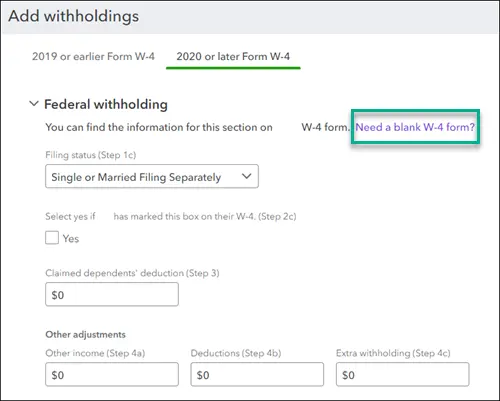
- Now, below the Federal Withholding, pick the link “Need a blank W-4 Form” and then print it.
Print a W-4 Pre-Filled with the details in your employee’s profile
- Choose the All Apps > Payroll and then click the Payroll Taxes.
- When you are in the Payroll Tax Center and hit the Filings tab.
- Now, scroll down to the Filing Resources section and opt for the Resources menu.
- Choose the Setup Forms and then click the Employee option.
- Thereon, hit the Employee drop-down arrow and pick the employee’s name.
- Later on, choose the W-4 and then the View option.
- At last, you can begin printing the W-4 forms.
Second Step: Have your employee fill out the W-4 form
It is essential that your employees fill out the W-4 form when you hire them, or if there are any changes in tax status.
Third Step: Provide Your Employee’s W-4 Details in QuickBooks
- Initially, browse to the All Apps option > Payroll > Employees menu.
- After this, pick your employee and click Edit menu from the tax withholding.
- When you are in the Federal Withholding section, complete the applicable details from your employee’s W-4 form. If they claim an exemption on the W-4, click the Filing Status drop-down arrow and click on Exempt.
- Choose the Save option after making all the changes.
QuickBooks Desktop Payroll
First Step: Print a blank W-4 Form
- Begin the process by choosing the All Apps > Payroll > Employees option.
- Choose the Employee Forms option and go further.
- Now, pick an appropriate W-4 form for your employee.
- Opt for either Federal W-4 2019 and Prior or
- Federal W-4 2020 and later
- As a result, you will get a PDF file open, click the File menu, and then choose the Print option.
Read More:- QuickBooks Desktop Payroll
Second Step: Have your employee fill out the W-4 form
In this step, your employees must fill out a W-4 form when you hire them or whenever changes are made to their tax status.
Third Step: Mention your employee’s W-4 details in QuickBooks
- Browse to the All Apps > Payroll > Employees option.
- After this, opt for Payroll Info and then hit the taxes menu.
- When you are in the Federal tab, click on the W-4 drop-down menu and pick the applicable form.
- Now, provide the employee’s W-4 details:
- If they exempt claim on the W-4 form, hit the Filing Status drop-down arrow and click Exempt.
- Finally, when the necessary changes are done, tap on OK.
How to Fill Out the W-4 Form in QuickBooks?
If you are facing issues while filing the W-4 form in QuickBooks, then perform the step-by-step instructions outlined below.
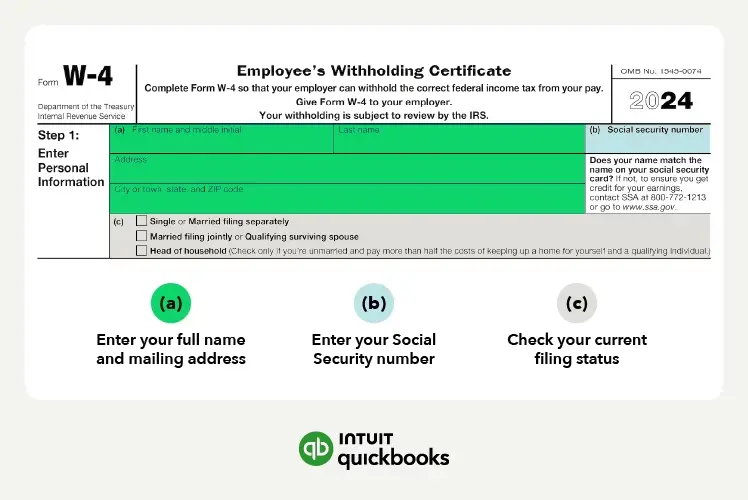
1. Personal Details:-
Firstly, you need to insert your full name, address, and Social Security number. You need to verify that the details entered must match with the information provided by human resource department to prevent any filing mess.
2. Multiple Jobs or Spouse also works
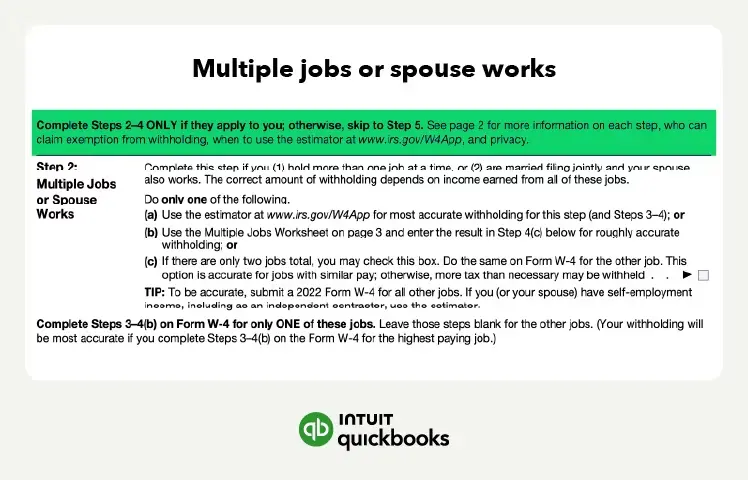
If you are working for multiple jobs or you are working as a spouse and you are filing jointly, then pick any one of the three options.
- Use the Multiple Jobs Worksheet
- Use the Estimator at www.irs.gov/W4App for accurate withholding.
- Check the indicated box if you have only two job portals.
It will only be applicable if you are personally holding more than one job, or married filing jointly, and have a spouse who also works.
3. Claim for any dependents
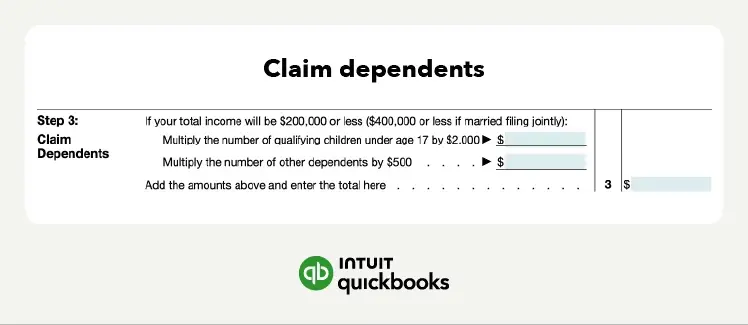
Now, you can claim for the dependents according to the instructions mentioned on the sheet. Make sure that it is only applicable if the total income is below $200,000 or less than $400,000 if married filing jointly.
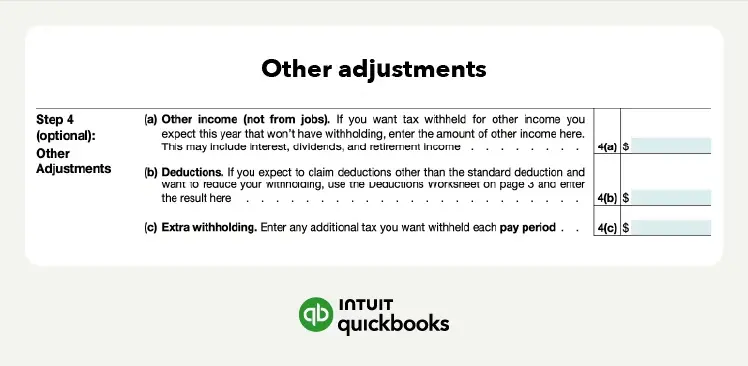
4. Other Adjustments
In this section, the IRS will prompt you to withhold additional income from your paycheck. The income might be because of other income sources, not from jobs, deductions, and general tax withholding. This part of the form is optional; you can also skip it.
- In case you are paying the least amount of taxes throughout the year, you mustn’t elect to withhold additional income. As per your situation, you are supposed to pay additional taxes at the end of tax season.
- On the other hand, if you wish to reduce the risk of paying an unexpected bill at the end of the year, avoid electing an extra income withheld. Doing so will minimize your take-home pay per paycheck and will offer you an extra benefit for tax season.
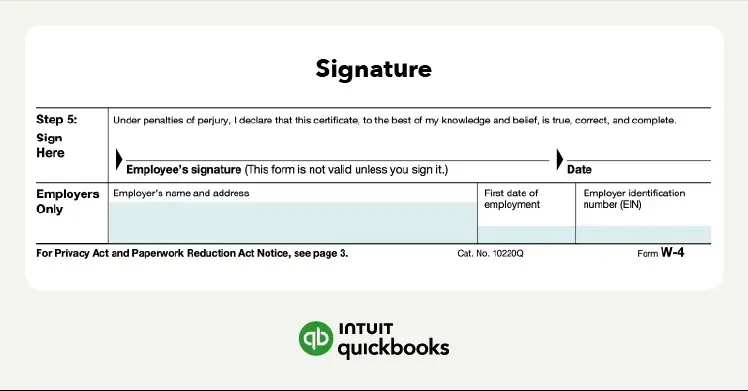
5. Sign Your Form
Now, you need to sign the W-4 form that will inform the IRS that you have filed the form accurately.
Conclusion
Through this guide’s help, you can easily file and print W-4 form in QuickBooks Online. Thus, it will help employers in computing your salaries accurately. Furthermore, if you still need any additional help, then connect with our BizBooksAdvice professionals for quick assistance.
Frequently Asked Questions (FAQ’s):-
Question 1: How to update W-4 in QuickBooks Online?
Ans. To update W-4 in QuickBooks Online, do as follows:
- Move to the Payroll menu > Employees and then choose the name of the employee.
- After this, tap on the Edit menu next to Pay > 2020 W-4 or later radio button.
- Insert the employee’s W-4 details in the form.
- Finally, hit the Done option after making the necessary changes.
Question 2: What is the maximum withholding for W4?
Ans. The amount for the extra withholding across taxpayers usually ranges from zero to $20,000 annually.
Question 3: What happens if you make a mistake on my W-4?
Ans. If you notice that your W-4 form is filled out inappropriately, then you must submit a new, corrected form to your employer asap. The earlier you correct the mistakes in the W-4 form, the more accurate the withholdings will be for the remaining year.
Question 4: What is the W-4 form?
Ans. The W-4 is an IRS document that you have to fill out for your employer to identify how much should be withheld from your paycheck for federal income taxes and then sent to the IRS.
Question 5: What is the difference between a W-2 and a W-4 form?
Ans. The W-2 is a form that is issued by employers for reporting wages and taxes withheld for tax filing. Whereas, the W-4 form is required to be filled out by the employees to identify how much federal income tax is withheld from their paycheck.
About The Author

Jonathan Browns
Jonathan Brown is a trained QuickBooks professional with 10 years of experience in the accounting sector. Moreover, he is passionate about helping businesses reduce the stress of managing accounts. Also, he is proficient in assisting entrepreneurs and small business owners to use QuickBooks and enhance their accounting experience.
Recent Posts
-
9 DIY Troubleshooting Methods to Fix QuickBooks Error 15270
-
QuickBooks Data Conversion Services: Everything to Know
-
QuickBooks Point of Sale: Features, Setup, Pricing & Best Alternatives
-
QuickBooks Scheduled Backup Not Working: Common Causes & Easy Fixes
-
QuickBooks Credit Card Processing: How It Works, Fees & Benefits