Is QuickBooks Desktop 2021 Be Discontinued? Latest Updates

- By Jonathan Browns
- May 13, 2026
- Accounting
- 7 min read
Are you still working on QuickBooks Desktop 2021 and received a notice about the service ending? If yes, then it’s because Intuit has put an end to the QuickBooks Desktop 2021 Discontinued products after 31st May 2024. According to this latest announcement, you won’t be able to receive live technical support if you get stuck while running this software. Apart from this, you will also not be able to get the latest security updates, which means your company’s data safety is at your own risk. So, it’s time to upgrade QuickBooks Desktop 2021 to 2024, the latest version available.
In this post, we have explained the complete details regarding the QuickBooks Desktop 2021 discontinuation and what your next move should be.
What Do You Understand By QuickBooks Desktop Discontinuation Policy?
The QuickBooks Desktop Discontinuation Policy means that Intuit is going to stop access to the QuickBooks Desktop 2021 products. Moreover, you can’t access the latest features available inside the program. Apart from this, it’s very important to understand that after the end of QuickBooks Desktop 2021, the QuickBooks Desktop Payroll, QuickBooks Desktop Payments, and online bank feeds can’t be accessed.
Products are affected by the QuickBooks Desktop 2021 Discontinuation
With the effect of the QuickBooks Desktop 2021 Discontinuation Policy, the following products are affected:
- Pro version of QuickBooks Desktop 2021.
- QuickBooks Desktop 2021 Premier.
- QuickBooks Desktop Enterprise Solution 21.
- Accounting edition of QuickBooks Premier 2021.
- QuickBooks Enterprise Accountant 21.
- QuickBooks Desktop 2021 for Mac.
What Other Features are Affected by the QuickBooks 2021 Discontinuation Policy?
After the amendment of the QuickBooks Desktop 2021 products with 31st May 2024, you won’t be able to access the following features.
- You can’t access the live support facility for the QuickBooks Desktop 2021 products.
- Also, you might fail to obtain the latest critical security patches and updates for the 2021 products.
- Moreover, you also can’t access the online banking, online backup, and bank feeds features.
- It also prevents access to QuickBooks Payroll and QuickBooks Desktop Payments (merchant services).
- Beyond this, you also can’t access other services through QuickBooks Desktop 2021.
What You Can Still Do In QuickBooks Desktop 2021 even after the discontinuation?
After the QuickBooks Desktop 2021 discontinuation, users can still open and access the software to view their company data. But you won’t be able to use access to the latest security updates and other features. The following are the other functions that you can still perform after the discontinuation.
1. Launch the Company files:
You still have the option to launch and then view your existing QuickBooks company file data. But you must remember that it’s not secure at all to perform the daily business operations.
2. Manual Activities:
Besides this, you also have the option to import the bank transactions manually or access the separate payroll providers.
3. Key Considerations to Remember:
You need to perform certain actions before you move from QuickBooks Desktop 2021 to 2024 or to the online version.
- You must generate the backup QuickBooks company file before moving to any other version.
- Also, you must look at the pricing plan of the QuickBooks Desktop 2024 or the QBO version to which you wish to migrate.
- Moreover, verify the system requirements before the migration.
- Above all, you also ensure that you have updated the QuickBooks Desktop to the latest version.
QuickBooks Desktop 2021 Discontinued: Here’s What to Do Next
As we have discussed, the QuickBooks Desktop 2021 will be discontinued by the 31st May 2024. So, now you need to plan what to do to resume with your ongoing task. Herein, we have described different ways in which you can switch after the discontinuation of 2021.
1. Upgrade QuickBooks Desktop 2021 to 2024
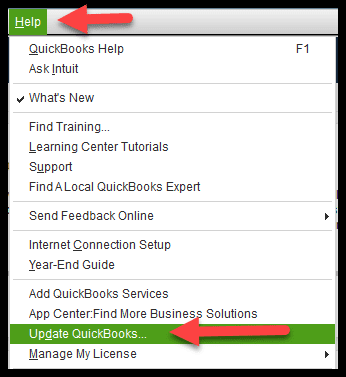
Before conducting the upgrade, don’t forget to generate a backup of your company file. Furthermore, perform these steps to upgrade the QuickBooks Desktop to the 2024 version.
2. Switch from QuickBooks Desktop to Online
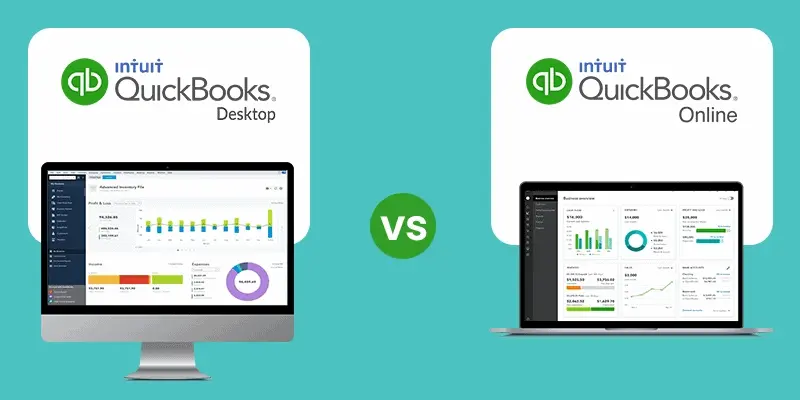
If you want to access the cloud-based features and want to access the automatic updates and backup feature, then it’s best to migrate from QuickBooks Desktop to Online.
Conclusion
Through this blog’s help, we hope that you have now obtained all the necessary information regarding QuickBooks Desktop 2021 Discontinuation. Also, it will help you in understanding where to switch after the discontinuation for a smooth accounting experience. Furthermore, if you still need any help, then connect with our BizBooksAdvice professionals for assistance.
Frequently Asked Questions (FAQ’s):-
Question 1: How long will QuickBooks Desktop 2021 be supported?
Ans. If you wish to get the QuickBooks Desktop 2021 version, then you can’t get it after the 31st May 2024. This is because Intuit is going to discontinue it and stop selling the 2021 product.
Question 2: What happens if I don’t upgrade QuickBooks Desktop?
Ans. If you don’t upgrade to QuickBooks Desktop 2021 after the discontinuation, you won’t be able to use the features, including online banking, security patches, live support, online backup, and QuickBooks payments.
Question 3: What is the cancellation policy for QuickBooks Desktop?
Ans. The users can get a full refund against the QuickBooks Desktop subscription when they cancel within 60 days of signing up. However, the refund will be processed to the credit card account through which you have made the payments.
Question 4: How long does it take to migrate QuickBooks Desktop to Online?
Ans. The time taken during the migration of QuickBooks Desktop to Online entirely depends on the amount of data you wish to transfer and the internet speed. Usually, the migration process may take around 72 hours, which may differ according to file size.
Question 5: What types of information will not migrate to QuickBooks Online?
Ans. You can’t migrate the Charts of Accounts, Customers and Jobs, Custom fields in Lists, Reminders, Scheduled transactions, and vendors list to QuickBooks Online.
About The Author

Jonathan Browns
Jonathan Brown is a trained QuickBooks professional with 10 years of experience in the accounting sector. Moreover, he is passionate about helping businesses reduce the stress of managing accounts. Also, he is proficient in assisting entrepreneurs and small business owners to use QuickBooks and enhance their accounting experience.
Recent Posts
-
QuickBooks Banking Errors: A Complete Guide to Common Issues and Fixes
-
QuickBooks Enterprise for Bookkeepers: Benefits, Features & More
-
QuickBooks Outlook Integration: Setup, Email Settings & Common Issues
-
Learn How to Write Off Bad Debt in QuickBooks Both Desktop & Online
-
Fix QuickBooks Error PS032 | QB Payroll Update Error
Need Assistance Right Away?
You can connect with a live representative to get help with your query or issue.