


QuickBooks Error PS036: Causes, Fixes, and Prevention

- By Jonathan Browns
- Jul 29, 2026
- Accounting
- 7 min read
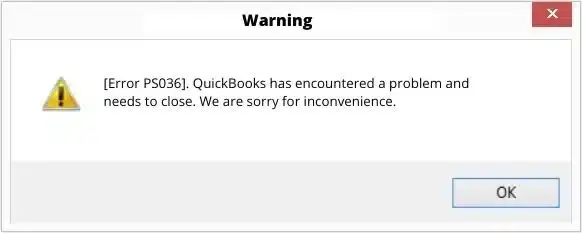
Running payroll on a deadline is stressful enough without your software throwing an error in the middle of it. If you’ve been greeted by a message referencing QuickBooks error PS036 while trying to download a payroll update, you’re not alone. It’s one of the more frequently reported payroll-related errors among QuickBooks Desktop users.
This guide breaks down exactly what the error means, why it happens, and how to work through it step by step, the same way you’d expect from a proper support walkthrough. You’ll also find a quick-reference table, a look at related PS-series errors you might encounter, and tips to help you avoid running into this again.
A Quick Overview of Error Code PS036
The following table provides condensed information about what we cover in this article.
| Error code | PS036 |
| Also referred to as | Payroll Subscription error PS036, QuickBooks Payroll error PS036 |
| Where it appears | While downloading payroll updates or tax table updates |
| Applies to | QuickBooks Desktop (Pro, Premier, Enterprise) with an active payroll subscription |
| Main cause category | Payroll subscription verification failure |
| Common triggers | Outdated software, incorrect billing details, damaged company file, corrupted registry entries, interrupted prior updates |
| Fix difficulty | Low to moderate — most users resolve it without outside help |
| Estimated time to resolve | 10–30 minutes, depending on the method needed |
| Data at risk | None, if steps are followed correctly and a backup is taken first |
| Tools you may need | QuickBooks Tool Hub, Intuit Account login, administrator access to your computer |
What Is QuickBooks Error PS036?
Error PS036 in QuickBooks is an error relating to a payroll subscription and appears when the program is unable to verify that your payroll subscription is active and valid, typically when it is trying to download the most recent tax table or payroll update; instead of finishing the download, QuickBooks stops the process and shows an error message referring to the PS036 code.
The error code PS036 in QuickBooks is part of a series known as “PS” errors, all of which are connected with payroll services and not with general program faults. The appearance of this error doesn’t always indicate that there’s a problem; more frequently it shows that QuickBooks and Intuit’s servers disagree regarding your subscription status and that something in between needs to be refreshed. This could be your software version, your billing record, or your company file.
Potential Reasons Why Payroll Error Code PS036 Arises
PS036 QuickBooks payroll error messages are very seldom due to a single cause, and in most instances it is one or more of the following that is the issue.
- Outdated QuickBooks Desktop software: Payroll updates are tied closely to your program version. If you’ve skipped several updates, the version mismatch can trigger a verification failure.
- Billing or payment details that are out of date: An expired card, an old billing address, or a lapsed payment method can prevent QuickBooks from confirming your subscription is active.
- A damaged or incomplete company file: If the file that stores your payroll and subscription data has minor corruption, QuickBooks may misread your subscription status.
- Corrupted Windows registry entries: QuickBooks stores certain configuration data in your system’s registry. If those entries are damaged, communication with Intuit’s servers can break down.
- An interrupted previous update: If a payroll update was cut short due to a power outage, a forced shutdown, or closing the program mid-download, it can leave your installation in a partially updated state.
- Multiple users accessing payroll under one license: In shared or multi-user environments, subscription conflicts can sometimes arise if licensing information isn’t syncing consistently across users.
- Firewall or security software interference: Overly strict firewall or antivirus settings can block QuickBooks from reaching Intuit’s payroll servers altogether.
Understanding which of these is most likely in your situation can help you skip straight to the fix that’s likely to work, rather than working through every step unthinkingly.
How to Fix QuickBooks Payroll Error PS036: Detailed Steps
Work through the following methods in order. After each one, try running your payroll update again before moving to the next step. Many users find the issue resolves well before reaching the later methods.
Method 1: Confirm Your Payroll Subscription Status
Let us begin by ruling out the simplest part, which is, of course, the Payroll subscription.
- Open QuickBooks Desktop and go to the Employees menu.
- Select My Payroll Service, then Account/Billing Information. This opens your Intuit Account in a browser.
- Sign in if prompted, and check whether your payroll subscription shows as Active.
- If it shows as expired, canceled, or on hold, renew or reactivate it before continuing to the next steps.
Method 2: Update QuickBooks Desktop to the Latest Release
An outdated program version is one of the most common reasons this error appears.
- Open QuickBooks Desktop and go to the Help menu.
- Click Update QuickBooks Desktop.
- Click the Update Now tab.
- Check the box for Reset Update to clear out any previously downloaded update files that may be incomplete.
- Click Get Updates and let the download finish completely.
- Close QuickBooks fully, then reopen it.
- When prompted, allow QuickBooks to install the update, and restart your computer if asked to.
Try downloading your payroll update again.
Method 3: Verify and Refresh Your Billing Information
Outdated billing details are a frequent reason for subscription verification failures.
- Sign in to your Intuit Account through your browser.
- Go to the Products & Billing or Subscriptions section.
- Check the payment method, billing address, and subscription renewal date.
- Update any information that looks outdated or incorrect, and save your changes.
Return to QuickBooks, restart the program, and retry the update.
Method 4: Run QuickBooks as an Administrator
Limited permissions on your computer can sometimes interfere with QuickBooks’ ability to connect to payroll servers properly.
- Close QuickBooks Desktop if it’s open.
- Right-click the QB Desktop icon on your desktop or in your Start menu.
- Select Run as administrator and confirm if prompted by Windows.
- Once QuickBooks opens, go to your payroll update settings and try again.
Method 5: Check Your Internet Connection and Firewall Settings
Since payroll updates rely on a live connection to Intuit’s servers, connectivity issues can produce this same error.
- Confirm you have a stable internet connection by loading a few web pages.
- Open your firewall or antivirus software and check whether QuickBooks or its related processes (such as QBW32.exe or QBUpdate.exe) are being blocked.
- Add QuickBooks as an allowed program or exception if needed.
- If you’re on a company network, check with your IT team about whether payroll-related domains are being blocked.
Retry the update once connectivity is confirmed.
Method 6: Utilize the QuickBooks Tool Hub
Intuit’s free diagnostic tool can detect and resolve a range of program and update-related issues, including many that lead to PS036.
- Download the QuickBooks Tool Hub from Intuit’s official website and install it.
- Open the Tool Hub and select Program Problems from the left menu.
- Click Quick Fix my Program and let it run.
- Once finished, go to Installation Issues again and select QuickBooks Install Diagnostic Tool if it’s available, and allow it to complete its scan.
Restart your computer, reopen QuickBooks, and try the payroll update again.
Method 7: Verify and Rebuild Your Company File
If your company file has minor data issues, it can interfere with how QuickBooks reads your payroll and subscription information.
- In QuickBooks, go to the File menu
- Now, choose Utilities and select Verify Data and let the scan run.
- If QuickBooks reports a problem, go back to File > Utilities and select Rebuild Data.
- Follow the prompts, and make sure you back up your company file when asked.
Once the rebuild completes, restart QuickBooks and try the update once more.
Method 8: Create a New Windows User Profile (If the Issue Persists)
In some cases, damaged settings tied to a specific Windows user account can be the root cause.
- Create a new Windows user account with administrator rights.
- Log in to that account and open QuickBooks Desktop.
- Try running the payroll update from this new profile.
If it succeeds, the issue is likely tied to your original Windows profile, and you may want to have your IT support review it further.
How to Prevent PS036 From Happening Again: Expert Tips
A few ongoing habits can reduce the chances of running into this error in the future:
- Keep QuickBooks Desktop updated regularly rather than letting several versions build up.
- Review your billing and subscription details every few months, particularly after changing banks or cards.
- Let payroll updates run to completion without closing the program or losing power mid-download.
- Run Verify Data on your company file periodically as routine maintenance.
- Keep your firewall and antivirus exceptions up to date so QuickBooks always has a clear connection to Intuit’s servers.
Related PS-Series Payroll Errors in QuickBooks Desktop
PS036 is just one of several payroll subscription and update errors that share striking similarities. If you manage payroll regularly, it’s worth knowing how these compare, since many of them share overlapping causes and fixes.
| Error Code | Contributing Factors | How It Differs From PS036 |
| PS032 | Payroll subscription not recognized, often after a recent renewal | Usually tied to billing sync delays rather than software version |
| PS033 | Corrupted payroll tax table file (CPS file) | Requires renaming or refreshing the tax table file directly |
| PS034 | QuickBooks can’t verify your Payroll Subscription | Closely related to PS036, but often points to a company file issue |
| PS038 | Pending payroll updates stuck in the queue | Focused on clearing paychecks or updates stuck mid-process |
| PS077 / PS107 | Damaged QuickBooks installation files affecting payroll downloads | Usually needs a program repair rather than a subscription check |
| PS058 | Error while downloading or installing a payroll update | Broader installation issue, not limited to subscription checks |
If you handle payroll regularly, it’s worth keeping guides for these related errors on hand too, since the diagnostic tools and general troubleshooting flow, updating QuickBooks, running the Tool Hub, and verifying your company file tend to apply across most of them.
When to Contact an Expert Directly for Assistance
If you’ve worked through the methods above and error PS036 is still appearing, it’s worth reaching out to Intuit support directly, especially in these situations:
- Your billing information looks correct, but QuickBooks still can’t verify your subscription.
- You manage payroll for multiple companies or a larger team and suspect a licensing conflict.
- The error started right after a recent QuickBooks or Windows update.
- You’re not comfortable making registry or system-level changes yourself.
Having your QuickBooks license number, payroll subscription details, and a description of the steps you’ve already tried on hand will help speed up the conversation.
Final Thoughts
QuickBooks error PS036 is inconvenient when it shows up right as you’re trying to get payroll out the door. However, you can resolve it with one of the standard fixes covered above. In the majority of cases, it comes down to an outdated program version, a billing detail that needs refreshing, or a minor company file issue, none of which put your data at risk when addressed properly.
Whenever you need expert assistance, you can contact us by calling the QuickBooks Payroll phone number Call Us : +1-866-408-0444 and receive smooth, stress-free payroll support.
Frequently Asked Questions
Can the fact that I have QuickBooks error PS036 indicate that my company file is corrupted?
It doesn’t have to be. Although a damaged company file might be one possible cause, this error is more usually due to the software version or the billing information. You can quickly find out whether the problem actually lies with your file by running Verify Data.
Will fixing PS036 make me lose any payroll data?
Not at all; provided that you carry out the standard troubleshooting steps and have backed up your company file before running Rebuild Data, none of the suggested solutions involve deleting or overwriting your payroll records.
Why does this error keep coming back even after I update QuickBooks?
If it recurs after an update, the root cause is usually tied to billing information or a registry issue rather than your software version. Try refreshing your payment details in your Intuit Account, then run the QuickBooks Tool Hub.
Can I still process payroll while this error is unresolved?
You can usually still create paychecks, but you won’t be able to use current tax tables until the update completes successfully. It’s best to resolve the error before running payroll to avoid tax calculation issues.
Do I need an active internet connection to fix PS036?
Most of the fixes require QB to communicate with Intuit’s servers, whether that’s to verify your subscription, download an update, or check billing status. Make sure your connection is stable and not blocked by a firewall before troubleshooting.
How is PS036 different from PS034?
Both relate to payroll subscription verification, but PS034 more often points to a company file issue, while PS036 is more commonly tied to billing or software version mismatches. The troubleshooting steps overlap significantly, so working through this guide will help with either one.
About The Author

Jonathan Browns
Jonathan Brown is a trained QuickBooks professional with 10 years of experience in the accounting sector. Moreover, he is passionate about helping businesses reduce the stress of managing accounts. Also, he is proficient in assisting entrepreneurs and small business owners to use QuickBooks and enhance their accounting experience.
Recent Posts
-
What Causes & How to Fix QuickBooks Error 15223 Efficiently?
-
QuickBooks Library Files Failed: How to Fix Error 80029c4a
-
How to Fix QuickBooks Error OL-301 (Bank Connection Issue)?
-
QuickBooks Email Invoices Not Working: How to Fix It
-
How to Resolve QuickBooks Error 15214 (Step-by-Step)