


QuickBooks Online Canada: Complete Guide for Canadian Businesses

- By Jonathan Browns
- Oct 15, 2026
- QuickBooks Online
- 7 min read
Managing business finances can become difficult when income, expenses, invoices, bills, taxes, and financial records are handled manually. QuickBooks Online Canada provides a cloud-based way for businesses to manage their accounting and keep their financial information organized.
Canadian businesses can use QuickBooks Online to track income and expenses, create invoices, connect bank accounts through QuickBooks Online Bank Feeds, manage GST/HST, and generate financial reports.
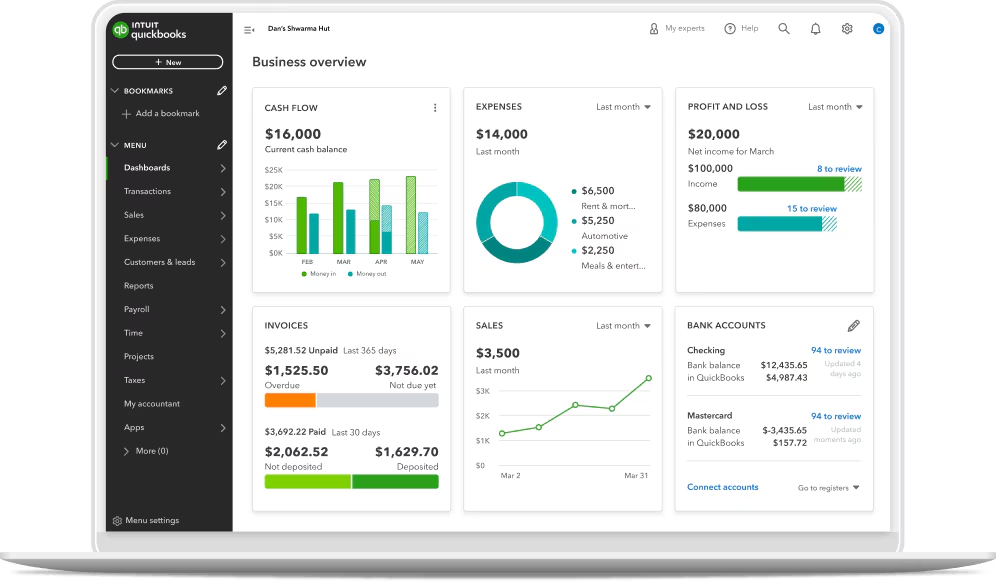
In this guide, we will explore what QuickBooks Online Canada is, its key features and benefits, pricing and plans, how to choose the right plan, and how Canadian businesses can get started with the platform.
What is QuickBooks Online Canada?
QuickBooks Online Canada is cloud-based accounting software designed to help Canadian businesses manage their financial activities online. It provides tools for bookkeeping, invoicing, expense tracking, bill management, tax tracking, and financial reporting.
Because QuickBooks Online is cloud-based, businesses can access their accounting information through an internet-connected device instead of relying on traditional desktop accounting software. If you are still on the desktop version, see our guide on how to migrate from QuickBooks Desktop to Online.
It also includes features designed for Canadian businesses, such as tools for managing GST/HST and other applicable sales taxes.
This makes QuickBooks Online Canada useful for small businesses, freelancers, self-employed professionals, and growing businesses that want to manage their accounting in one place.
Key Features of QuickBooks Online Canada
QuickBooks Online Canada offers different features that can help businesses manage their everyday accounting tasks and keep their financial records organized:
Income and expense tracking
QuickBooks Online allows businesses to record and categorize their income and expenses. This helps business owners understand where their money is coming from and where it is being spent.
By keeping income and expenses organized, businesses can also make it easier to review their financial performance and prepare financial reports.
Invoicing and payments
Businesses can create and send invoices to customers using QuickBooks Online. Invoices can be customized with relevant business and customer information.
Businesses can also track invoice status and monitor outstanding customer payments. This can make it easier to keep track of money that is still owed to the business.
Bank account connections
QuickBooks Online can connect with supported financial institutions, allowing eligible banking transactions to be imported into the accounting system.
These transactions can then be reviewed and categorized. This can reduce the amount of manual data entry and make bank reconciliation easier.
GST/HST and sales tax management
Canadian businesses may need to collect and manage GST/HST or other applicable provincial sales taxes.
QuickBooks Online Canada provides tools that can help businesses track applicable sales taxes and include the relevant information in their accounting records and reports.
This can help businesses keep their tax-related financial information organized.
Financial reporting
Financial reports help businesses understand their financial position and performance.
QuickBooks Online can generate reports related to income, expenses, profit and loss, accounts receivable, and other financial information. For future planning, try the QuickBooks Online Forecasting Tool.
These reports can help business owners review their finances and make better business decisions.
Bill and expense management
Businesses can use QuickBooks Online to record bills and track payments made to suppliers and other vendors.
It can also help organize business expenses and monitor amounts that need to be paid.
This makes it easier to keep track of both incoming and outgoing money.
Cloud and mobile access
QuickBooks Online is cloud-based, so authorized users can access their accounting information through a supported web browser with an internet connection Here is how to do a QuickBooks Online login.
Mobile access may also be available through supported applications, allowing users to manage certain accounting tasks while away from their computer.
Benefits of QuickBooks Online Canada for Canadian Businesses
QuickBooks Online Canada can provide several benefits for businesses that want to simplify their accounting processes.
Here are some of the key benefits:
- Simplifies accounting: Businesses can manage income, expenses, invoices, bills, and financial records from one platform.
- Saves time: Automation and bank connections can reduce repetitive manual accounting tasks.
- Improves financial organization: Keeping transactions and accounting information in one place can make financial records easier to manage.
- Supports tax tracking: Businesses can track applicable GST/HST and other sales tax information.
- Makes invoicing easier: Businesses can create, customize, and send invoices and monitor outstanding payments.
- Provides financial insights: Financial reports can help business owners understand income, expenses, profitability, and other financial information.
- Provides online access: Since the software is cloud-based, authorized users can access their accounting information from different locations.
Is QuickBooks Online Canada Suitable for Small Businesses?
Yes, QuickBooks Online Canada can be suitable for many small businesses. Small businesses often need to manage income, expenses, invoices, bills, taxes, and financial reports without maintaining complicated accounting systems.
QuickBooks Online provides these features in one platform, which can make everyday accounting tasks easier to manage.
It can also be useful for freelancers and self-employed professionals who need to track business income and expenses and maintain organized financial records.
However, the right accounting software depends on the business’s requirements. Businesses with more complex accounting needs may still need help from a QuickBooks Online accountant or bookkeeper.
QuickBooks Online Canada Plans and Pricing
QuickBooks Online Canada offers different plans designed for different business requirements. The features, number of users, and pricing can vary depending on the plan. Compare QuickBooks Online Essentials and QuickBooks Online Advanced to see which fits you best.
When comparing plans, businesses should look at factors such as:
- Number of users
- Income and expense tracking
- Invoicing features
- Bill management
- Financial reporting
- Bank connections
- Tax-related features
- Payroll requirements (see QuickBooks Online Payroll and the QuickBooks Online Payroll subscription)
- Additional accounting features
Pricing and available features can change over time, so businesses should review the current QuickBooks Online Canada plans before choosing a subscription.
How to Choose the Right QuickBooks Online Canada Plan
Choosing the right plan depends on the size of your business and the accounting features you need.
Here are some factors to consider before selecting a plan:
- Consider your business size: A freelancer may have different requirements than a growing business with multiple employees and users.
- Check the number of users: If several people need access to the accounting system, check how many users are supported by each plan.
- Review accounting features: Look at the features included in each plan and identify which ones your business actually needs.
- Consider invoicing requirements: Businesses that send many invoices should make sure the selected plan provides the invoicing features they need.
- Check tax requirements: Canadian businesses should consider their GST/HST and other applicable sales tax requirements.
- Consider payroll needs: If your business has employees, check whether the plan or available services meet your payroll requirements.
- Think about future growth: Your accounting needs may increase as your business grows. Choosing a plan that can support future requirements can help avoid unnecessary changes later.
QuickBooks Online Canada vs. Traditional Accounting Software
Traditional accounting software is generally installed and operated on a computer, while QuickBooks Online is cloud-based.
With cloud accounting, financial information can be accessed online by authorized users. This can make it easier for business owners, employees, bookkeepers, and accountants to work with the same financial information.
QuickBooks Online can also provide automatic updates and online data access, while traditional desktop software may require more manual management.
However, the right option depends on the business. Some businesses may prefer desktop accounting software based on their specific requirements, workflow, or accounting setup.
Getting Started With QuickBooks Online Canada
Getting started with QuickBooks Online involves setting up your business and configuring the accounting features you need.
Here are the basic steps:
- Choose a plan: Review the available QuickBooks Online Canada plans and select one based on your business requirements.
- Set up your business: Enter the required business information and configure your accounting settings.
- Connect your bank accounts: Connect supported Canadian financial institutions so eligible transactions can be imported and categorized.
- Set up taxes: Configure GST/HST and other applicable sales tax settings based on your business requirements.
- Set up invoices and expenses: Customize your invoice settings and organize the categories you will use to record business expenses.
- Start recording transactions: Record and categorize income, expenses, bills, and other business transactions.
- Reconcile your accounts: Regularly review your bank transactions and reconcile your accounts to help keep your financial records accurate.
- Review financial reports: Use available reports to monitor income, expenses, profit and loss, accounts receivable, and other financial information.
QuickBooks Online Canada: Pros and Considerations
QuickBooks Online Canada can make accounting easier for many businesses, but there are also some factors to consider before choosing it.
Advantages
- Cloud-based accounting
- Online access to financial information
- Income and expense tracking
- Invoicing and payment tracking
- Bank account connections
- GST/HST and sales tax tracking
- Financial reporting
- Accounting automation
Considerations
- Pricing depends on the selected plan.
- Features can vary between plans.
- Businesses with complex accounting requirements may need professional accounting support.
- Cloud-based accounting requires an internet connection for online access.
- Businesses should review the available features before selecting a plan.
Who Should Use QuickBooks Online Canada?
QuickBooks Online Canada can be useful for different types of businesses and professionals, including:
- Small businesses
- Freelancers
- Self-employed professionals
- Startups
- Service-based businesses
- Growing businesses
- Businesses working with accountants or bookkeepers
The right choice depends on the business size, number of users, accounting requirements, and features needed.
Tips for Using QuickBooks Online Canada Effectively
Using accounting software regularly can help keep business finances organized. Here are some tips for using QuickBooks Online Canada effectively:
- Record transactions regularly: Avoid leaving income and expenses unrecorded for long periods.
- Categorize transactions correctly: Use appropriate categories to keep financial records organized.
- Reconcile bank accounts: Regular reconciliation can help identify missing or incorrect transactions.
- Track outstanding invoices: Regularly review unpaid invoices and follow up with customers when required.
- Keep tax information organized: Maintain accurate records of GST/HST and other applicable sales taxes.
- Review financial reports: Check financial reports regularly to understand how the business is performing.
- Limit account access: Give access only to people who need to use the accounting system.
Keep records updated: Regularly updating accounting information can make it easier to understand the current financial position of the business.
Summing Up
QuickBooks Online Canada can help you manage income, expenses, invoices, bills, bank transactions, GST/HST, and financial reports without maintaining everything separately. Start by choosing the right plan for your business, set up your account correctly, connect your supported bank accounts, and make sure your income and expenses are recorded properly.
If you are unsure which plan is right for your business or need help setting up and managing your account, Call Us : +1-866-408-0444 can help you review and manage your QuickBooks accounting. You can also reach out through QuickBooks Online Customer Service.
Frequently Asked Questions
What is QuickBooks Online Canada?
QuickBooks Online Canada is cloud-based accounting software designed to help Canadian businesses manage bookkeeping, invoicing, expenses, payroll, and financial reporting online.
Is QuickBooks Online available in Canada?
Yes, QuickBooks Online offers plans and features tailored to Canadian businesses, including Canadian tax and accounting requirements.
What can I do with QuickBooks Online Canada?
You can use QuickBooks Online Canada to track income and expenses, create invoices, manage bills, reconcile bank transactions, generate financial reports, and organize business finances.
Does QuickBooks Online Canada support GST/HST?
Yes, QuickBooks Online Canada includes tools for tracking and managing applicable Canadian sales taxes, including GST/HST and other provincial taxes.
Can I access QuickBooks Online Canada from anywhere?
Yes, because QuickBooks Online is cloud-based, you can access your account through a supported web browser and, where available, mobile applications with an internet connection.
Is QuickBooks Online Canada suitable for small businesses?
Yes, QuickBooks Online Canada offers features designed for businesses of different sizes, making it suitable for many Canadian small businesses, freelancers, and self-employed professionals.
Can I connect my Canadian bank account to QuickBooks Online?
Yes, QuickBooks Online can connect with supported financial institutions, allowing you to import and categorize eligible banking transactions and simplify reconciliation.
Does QuickBooks Online Canada offer invoicing?
Yes, you can create, customize, and send invoices, track their status, and monitor outstanding customer payments.
Can QuickBooks Online Canada generate financial reports?
Yes, QuickBooks Online provides various reports that can help you review income, expenses, profit and loss, accounts receivable, and other financial information.
Is QuickBooks Online Canada cloud-based?
Yes, your accounting data is stored online, allowing authorized users to access the account without installing traditional desktop accounting software.
How do I choose the right QuickBooks Online Canada plan?
The right plan depends on factors such as the size of your business, number of users, accounting requirements, payroll needs, and the features you need. Review the available plans and compare their features before choosing one.
Is QuickBooks Online Canada easy to use?
QuickBooks Online is designed with a user-friendly interface and automation features that can simplify common accounting tasks. However, businesses with complex accounting requirements may still benefit from professional accounting advice.
About The Author

Jonathan Browns
Jonathan Brown is a trained QuickBooks professional with 10 years of experience in the accounting sector. Moreover, he is passionate about helping businesses reduce the stress of managing accounts. Also, he is proficient in assisting entrepreneurs and small business owners to use QuickBooks and enhance their accounting experience.
Recent Posts
-
Fix Your QuickBooks Online Sync Problems: A Step-by-Step Guide
-
QuickBooks Online Canada: Complete Guide for Canadian Businesses
-
A Guide On How To Upgrade QuickBooks Desktop To 2024
-
QuickBooks Desktop Invoice Missing? Top Methods to Fix It Now
-
QuickBooks Desktop 2024 R21_65 Update: Release Details and Installation